Friday, October 16, 2020

151 Days In...

The 18th of May was last day on the job. It was a job that I had for less than a year, but, it was a job that I liked and, from what I understand, the people that I worked for liked my work and really didn't want to lay me off. I suspect that they didn't want to reduce their worldwide staff by 25%. Between COVID-19 and issues with one of the major players in the industry that I have worked in for the past 15 years, a perfect storm was created that has put me and a lot of other good scientists, engineers, and technicians back into the pool of perspective job candidates. 

This was not the first time that I have been part of a reduction in force. This time was different in that I was given just over 2 weeks notice. In my previous layoffs, I thought that I would have liked some sort of warning that a layoff was coming. The first time I was involved in this sort of a situation, I could tell by the amount of work that I had and what was going on in the company that the layoff was coming. While I started to take my personal items home about a week before the axe was officially dropped, I still had some hope that things would change. I had been there for five years and with my marriage was less than two years old, I was feeling stress in a way that was totally foreign to me. I was not only worried about how I was going to take care of my wife, but I knew a lot of people who were also out of work. There was a lot of competition for very few openings. I had wished that the people that I worked for had communicated better what the state of the business was and let people know what their short term futures were. 

Those wishes were fulfilled during the job loss that happened in May. I don't think the advanced warning made things better as I thought it would. While my wife and I were able to start cutting our expenses earlier, the work was harder. Since I was paid through my last day, I worked as hard as I could through that last day. It isn't in my nature to do otherwise. It was hard to forecast projects that I knew I would not see to completion. It was a challenge to be sure not to say too much to clients or suppliers. I was given no direction as to what I was allowed to talk about. The only real benefit was that I was able to hand off my projects and make the transition easier. Ultimately, the transition was made easier for my former employer, but I can feel like I did my best work until the end of my last day on the job.I did get a chance to talk to some of my clients and secure recommendations and references. I think that worked out better form me in that it demonstrated my professionalism to any future employer.

Ultimately, having your job end is not a pleasant experience in most cases. I don't think that having an explicit end date defined was the improvement on the situation that I thought it would be. The end result is the same and the next steps to be taken are the same. It is a better to pay attention to what is coming next that it is to dwell on the past. It is said that a waste of time keep looking back. That is not where you are going. There is a reason why it is called the road ahead.


Wednesday, September 16, 2020

So, That Wasn't the Outcome You Wanted...

We are living in a time of high unemployment and a pandemic. There have been wildfires on two continents. Our world has been fractured and divided in ways that have no historical precedent. With all of this stuff going on in the world, not only are there many people looking for work, but the way we job hunt has change a lot in the last year. Something that hasn't changed is the variables in the act of job hunting that are completely out of our control.

A universal part of job searching is the rejection component. I don't know of anyone who has received a job offer from every business that they applied to. There are more people looking for work than there are open positions. Even with these commonly known factors, being rejected for a job is hard. It is hard because you may be desperate to find work to support the family. It is hard because that job may represent a big move in your career. When you applied for the job, and when you were interviewed for the position, you may have thought that you are perfect for the role and that you could make a big impact on the business. When that rejection notice comes, it feels like the people you met with didn't see how perfect you are for the role. The rejection with no explanation and closure feels empty and presents a real opportunity for someone to feel down about themselves. The questions start to pile up with no answers to relieve them. While the chance to become disappointed and depressed about the situation has a lot of gravity to it, it is important to remember some helpful bits of reality.

1) All job searches are competitions. It is easy to forget that there are more people, besides you, applying for the same jobs that you are. Unlike other competitions, like sports or debate, you have no information about who you are competing with. Even though having that information would be completely useless, remembering that simple fact makes a big difference. The company that you applied to and interviewed with is looking for the best person that they think will fill the role. It is about making their business better, not about you feeling worse. There is nothing personal to it.

2) It is important to also remember that while you may apply to 5-10 jobs per week, the companies you are submitting to are hearing from a lot of other people going for a lot of positions. Reading and sorting through the resumes and cover letters takes along time. Stuff gets missed. A hiring manager may only spend a few seconds looking at a resume. Most of the time, reviewing resumes and job applications are not anyone's full time, all of the time job. Clearly, they are hiring because they recognize that they need help.

3) Just because you didn't get this job, does not mean that you are not unemployable. It is easy to fall into that hole of self-doubt. This disappointment is temporary. Keep looking and applying for the job that you want.

4) The inverse situation is just as important. You don't need to accept every job offer that comes. If you feel like that culture at the company may be toxic, or the commute is farther than you can stand, or you don't want to move to a new state, you don't have to accept the role. With all of that said, you may need to be careful how you do that. Sometimes, when a person is receiving unemployment, that may be required to accept any offer that comes. If that is the situation that you are in, it would be wise and proactive to withdraw from the position before that get to the offer phase. Remember you are evaluating the prospective employer as much as they are interviewing you. Otherwise, you might just be exchanging the misery of unemployment for the frustration of being in a job that you don't like.

I have been writing this from my own recent experiences. I have been writing this for myself as well as for anyone who could be helped by reading this. I am telling me and telling you to keep pushing. We are in a bad job market. There is a lot of competition out there and you have no idea if the people who got the jobs you didn't are better suited for the jobs than you are. It is a waste of time and resources to dwell on it. Focus on your strengths and talents. You are selling yourself in the act of job hunting. Put forward the best product that you can. 


Tuesday, September 15, 2020

Voice Lessons: No Escape

 I have been primarily using an iPad Pro for a little over a year. I went this route because my work horse 2011 MacBook Pro, while still working, is not working as well as it did when I first got it. For a while, while my MacBook was unavailable, I used an iPad Air 2 with a keyboard to get most things done. This experience really got me thinking about what the limitations of the iPad really are, versus the limits of my knowledge of how to use the device. 

Part of the decision to go with the iPad Pro over buying another MacBook (Pro or Air) had to do with how much I like to use iPad OS. While there was a stretch of time where it was necessary to figure out how to do my tasks with apps and the operating system, the experience caused me to develop an affinity with iPadOS. While some people complain about multitasking, I found it to be very useful and with some tweaks to my workflow, I was able to get it to work almost as I needed.

 Almost is where the story really begins. My current setup is a 2018 12.9 inch iPad Pro in a Smart Keyboard cover and the Apple Pencil. When I bought it, the plan was that this was going to be my daily driver. My computing needs primarily revolve around writing, email, household accounting, task management and social media. None of these functions require a ton of computing power. I don't write code or edit large audio or video projects, so it seemed like the iPad would be up to the missions that I have. For the most part, my tasks are nearly achievable with the iPad.

 I was able to adapt the stuff that I do to the new environment. In my day job though, I use Excel quite a bit. I have learned to do a lot of things with the software, in terms of analyzing data and looking for trends. Excel has been a key part of my work for over 15 years and it has become a comfortable tool for doing statistical analysis. When I tried to go with the iPad only lifestyle, I started using Numbers. It was because it came on the iPad and I was able to figure out how to make it fit into my workflow. I wrote some simple formulas for doing some basic spreadsheet work. As I worked on the templates and macros, I wanted to add more functionality and automation to the sheet. I quickly realized that there is some functions in Excel that is missing in Numbers, namely being able to do pivot tables with the data. A pivot table is a tool used to breakdown larger statistical data sets based on categories that the data falls into. I use them to evaluate how frequently certain things happen in my work. I also use them at home to break down the expenditures in my family's budget by category. Numbers kinda sorta break down the data, based on category, but there is still some manually math that has to happen to get to where a pivot table in Excel gets me. Why do math in a calculator from numbers on a spreadsheet? I installed Office 365 on my iPad and it bridged a lot more of the gap between what I needed to do and the limits of the iPad. However, it is still not possible in the MacOS version of Excel to create a pivot table. A previously created table can be refreshed, but a Mac or PC is required to build the initial pivot table. That was one problem that was beyond the iPad to solve.

Another thing that I was not able to do in MacOS was to use some of the functionality on some websites that I work in. Whenever I went to access those sites, the operating system keeps trying to push me to use the app version of the product. The apps have a lot of limitations when compared to the web version of the product. I needed to access the sites on a Mac or PC to use all of the functionality available. That was a second problem that was beyond the iPad's grasp.

Even though I don't write code, I do write formulas and equations for analyzing data sets. I have been doing this for a long time and have gotten in the habit of using the Escape key when I have made a mistake in my formula and need the algorithm to go away so I can start it over. The smart keyboard does not have an Escape key. I don't know of a keyboard made to go with the iPad that has an Escape key. I know that I could remap a key to give myself one, but, that would not solve the problem of muscle memory. Sometimes, I use the back-tick (`) and remapping that key just changes the name of my problem instead of solving it. I remember when Apple released the first Touch Bar MacBook Pro models and developers talked about the lack of a physical Escape key and I could relate the the concern.

For as much as I wanted my iPad Pro to be my only computer, I find myself in that space where it was not going to solve all of my computing needs. Also, it created some artificial limits

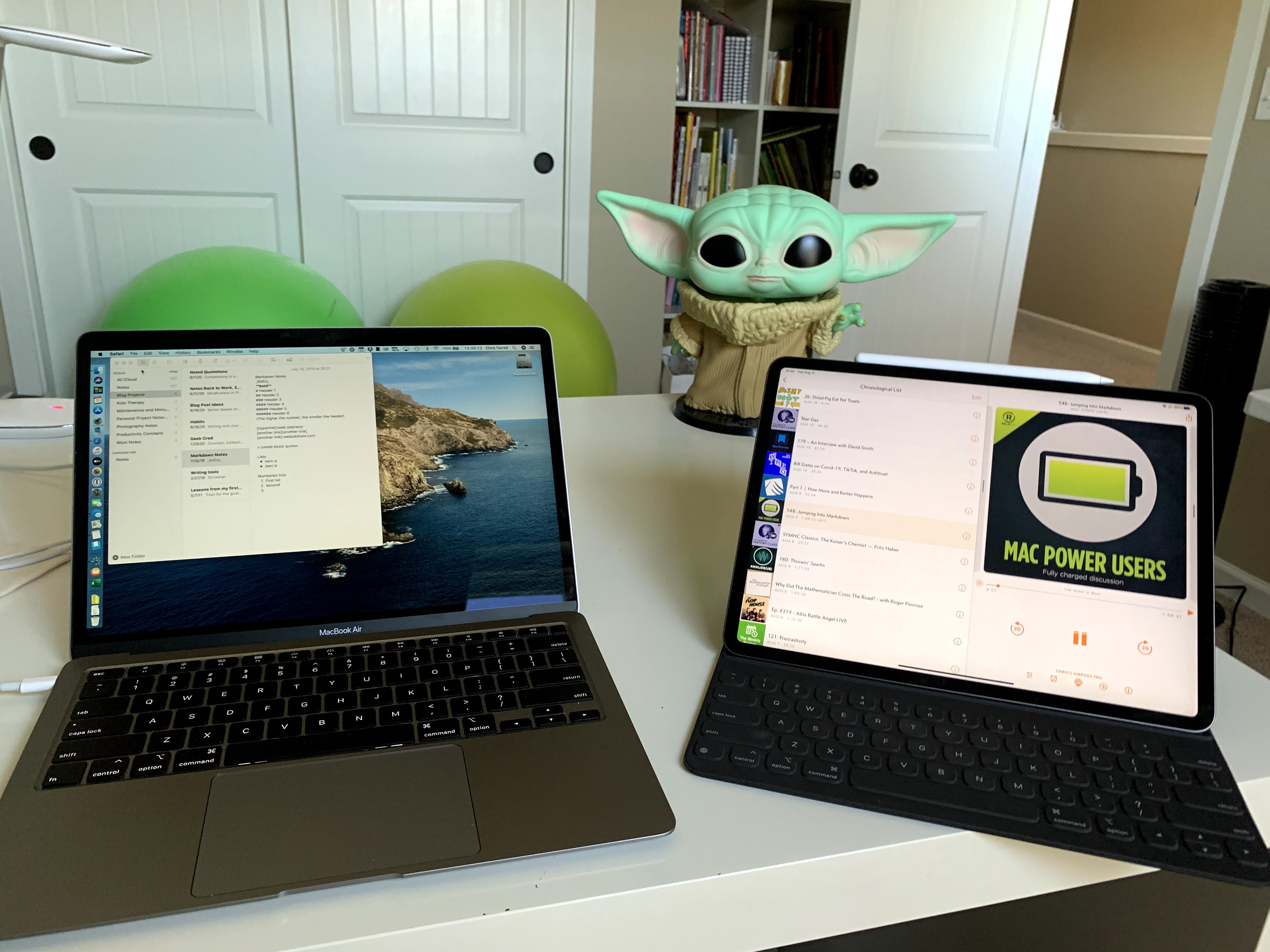
iPad, MacBook and Baby Yoda

around developing future skills. There have been more than a few occasions where I have thought of teaching myself how to write code. As a result, I bought a 2020 MacBook Air. The scissor switch problems on Apple laptops that people were reporting was part of my reason with trying to go iPad only. I was determined to wait through the era of the scissor switch keyboards before I considered buying a new Mac. While the 16 inch MacBook Pro came out earlier this year, it is way more computer than I need or could afford. My daughter told me that she likes my computer. "It is cute and small," she said. Ironic considering I think my wife's 17 inch laptop is huge. Generally speaking, I am not a fan of bigger laptops. If I need something that big, I wouldn't haul it around much, so an iMac would do the job.

As far as the MacBook Air goes, I freaking love this thing. Even for being a consumer grade computer, it out performs my old MacBook Pro. Considering that the Air it is almost 10 years newer, it should out run my MacBook Pro. I also love not having to deal with the response times of spinning hard drives. The 13 inch MacBook Pro was announced the Monday after I ordered the Air. If I edited video in 4K, or wrote code professionally, I would have cancelled my Air order and gone with the new 13 inch MacBook Pro. The thought that Apple would start making computers with ARM chipsets, instead of Intel, was not something I had considered a near term possibly.  The Air not only meets my short term needs, but I think I will be able to use it for many years to come.  I did the migration of my data from the old machine overnight and it took about 5 hours. I am glad that I slept through that. So far, in the time that I have had it, I have not had any trouble with the Air. I love how the keyboard feels as I type and there is a physical Esc key. It feels like things are in order. While some people have talked about problems with thermal performance, I have not experienced any of those issues. I also don't try to use my MacBook like a gaming PC. Another plus to the Air, versus my old MacBook Pro is that I can reliably do video calls on it. With job interviews being done on Zoom, Google Meet, or Skype, The MacBook Air has been able to handle it. I am not sure that my MacBook Pro could have. Even with the 720p camera, I have been clear on camera and the people I have been meeting with have been able to hear me with no issues.

 Where does this leave me, in terms of my iPad? I still use it every day and it accomplishes a lot of my basic tasks. The workflows that I developed for performing tasks on the iPad are still faster to do than on my MacBook, so I still gravitate to it for those actions. I am also using it for things, like email, that I do in the evening while watching TV with the family. I am also using the MacBook on a daily basis. It has been perfect for doing things, like job hunting, where some of the websites do not allow the use of a phone or tablet. I am also using it to do things like building more complicated spreadsheets and teaching myself how to code. Mostly the computer that is in front of me is the computer that I can get things done with. 

Monday, September 14, 2020

The 5 Hour What?

 I recently experienced a job interview that lasted 5 hours. It sounds weird at first pass, but, given how COVID has changed so much about how the working world operates, it makes sense. Between social distancing and extra steps around mask wearing and the sanitizing of hands, businesses are having to figure out different ways of identifying and recruiting new talent. Even something as simple as a handshake is now only referred to in nostalgic remembrance. 

During the time that I have spent looking for new work, I have had a job interviews take some new and interesting forms. Phone screens are about the same as they were before the shelter in place way of life  I have had onsite interviews where there were modifications to the conference room to partition spaces for individuals to be seen through plexiglass during panel interviews. I have had socially distant interviews where there has been several empty seats in between participants. The most interesting twist on the panel interview I have experienced was a virtual interview that took five hours. It sounds intimidating and really arduous, but I found the experience to be very pleasant.

The interview was broken up into half hour increments and I met with people in different areas of the business that I would potentially be working with and people who current have the role that I am applying for. Even though I talked to ten people, it was not as stressful or pressure loaded like a traditional panel interview can be. The questions were more handled in a more conversation way and it made the whole process more organic. I think that I did better being interviewed in this format. It was more relaxed and even though I saw that same sorts of questions being asked, I was able to answer based on who was asking. From the side of the people doing the interviewing for the company, sometimes instead of listening to the answers to questions asked by others on the panel, they focus on the question they are waiting to ask. From the perspective of the person being interviewed, it can feel like a board of inquiry.

Even though it seems like a huge amount of time, the people who were conducting the interviews were only committed to a 30 minute intervals, so their working day was not horribly interrupted, and in talking to people from different elements of the business, I got a very good sense of what the culture is like. I can also make some different, informed decisions about if the company feels like a good fit for me. Considering that job interviews should be just as much about the candidate evaluating the company as it is about the business evaluating the applicant.

Since I think that the process of interviewing for jobs is heading toward this direction, here are some tips for getting yourself and your space ready for a remote interview.

1) Make the space your are interviewing in as comfortable and visually appealing for the camera.

I am not talking about cleaning up the whole space, but think about what the person on the other side of the camera. Keep it simple, clean and uncluttered. You don't want the person you are talking to pay more attention to what is behind you than what you have to say.

2) Test your camera set up before the interview.

Remember that you are trying to make a good impression to the person you are interviewing with. Technical problems will get the interview off on the wrong foot. 

It is not just if the camera or the internet work, but test what the other person will see. Most of us don't have a video studio we can interview from. Make sure the lighting is brighter on you than it is behind you. You don't want to look like a silhouette or have shadows obscuring half of your face. In my case, I have a window behind me when I am sitting at my desk. I closed the curtains behind me and I have an LED ring light that I clipped to the other side of the desk to make sure that the right amount of light is in the right places. It is also a good idea to check to see how well your microphone works. This will tell you if you need to use a different microphone than the one that is built into your computer. It makes sense. You want to make sure that the person on the other side of the internet can hear you. 

3) Dress as though you are meeting in person.

The adage is to dress for the job you want. Virtue interviews are not an exception to that rule. Not only does the visible part of you have an impact on the impression that you make, it also gets you in the right mindset for the interview. Some might think that they could get away with a dress shirt, tie and pajama bottoms. I would not recommend that. The frame of mind is a lot more important and, you can tell if someone is wearing the proper pants on camera.

4) Eat before and have water with you

It seems obvious, but being at home can cause some behavior patterns that are really different from the life of being in public. Sleep schedule and eating routines are usually the first to go. A light, protein loaded breakfast will help you stay focused during the interview and prevent audible stomach growling. Even if it isn't picked up on the microphone, it can distract you as you are talking. 

Having water with you in the room is a good idea. It is totally acceptable to sip water during the conversation and water will not leave visible stains like coffee might. I recommend a container with a lid. You want to drink the water, but the computer does not. This is especially important if the interview is booked for longer than an hour. Just because you have the water does not mean that you have to drink it all before the end of the interview. A bathroom break in the middle of the interview could leave a negative impression.

While the methods and use of technology may be changing how job interviews are conducted, the end goals are really the same as they ever have been. The perspective employee and the business are interviewing each other to see if working there is a good fit for both parties. Doing it over the internet is not any easier or harder than doing it in person, only different. The need for preparation and professionalism on both sides are unchanged. This is just another adaptation to how the world has changed.

Tuesday, January 1, 2019

Podcast Overload

It is the start of 2019 and a lot of people talk about resolutions. As I have written before, I am not one of those people. I think that everyone has the opportunity to change things about their life whenever they choose to. That having been said, when someone has a long term, say a year long, project, starting on 1 January is a good benchmark for measuring the progress over the course of a year.
Most people who know me in the walking around world know that I like podcasts. I like them a lot. I listen to topics ranging from technology, to space, to running to movies and other sorts of stuff. The term problem would be a strong one, so I will say issue instead. The issue is that I have quite a backlog of podcasts. 711 podcasts as of the morning of January 1.
Screen shot from my Overcast app.
That represents about 33.2 GB of space, or half the total capacity of my iPad Air 2. Some of the files go back as far as 2016.
Some people talk about declaring podcast bankruptcy, which is the simple act of clearing out some or the entire podcast queue and starting over. I really don't want to do that. Some of the files are for podcasts that have completed their run of shows, such as Canvas. I want to finish that run of show out and that act will help to reduce some of the total shows and memory space used. There are other shows, that I will stop after I finish a particular run of shows, such as The Horror Aisle, where my brother was one of the hosts. I want to finish out his run on the show.
The other thing is that it seems like I hear about new podcasts that I want to start listening to all of the time. One show in particular, Friends in Your Ears, seems to always suggest one or two new shows to try out. When people ask me how I find out about new shows, I always recommend that one as a place to start.
As for my strategy to get caught up on Podcasts in 2019, the first is to  keep current on the ones that I am listening to now. I am adjusting one of Dave Ramsey's baby steps for getting out of debt by getting caught up and staying current on shows, like one might get caught up on past due bills and stay current on those moving forward.
The second step is to work on completing the podcast runs of shows that have ended, or I know where my finishing point is. Then, the last pieces is to simply listen to a couple more shows than I download. Some shows are super short, while others are anywhere from 90 minutes to the occasional 3 hour show. Let's see how this goes.
As far as this project goes, my plan is to update my progress here on a weekly basis. It will not be the only thing that I write about, but it will be a recurring topic as 2019 goes. I will mention when a show ends, I get caught up, or when start a new one in a moment of weakness. This should be a fun experiment.

Monday, November 19, 2018

Voice Lessons


I have been seeking advice from a lot of people with regards to blogging. Specifically, how do you know what to write about. The consistent response that I get, to boil it down to a common thread, is to "find my voice." 
Finding my voice, basically, is to figure out what sort of topics I want to write about. This has been a hard thing for me to do. I have a dozen bits and pieces of blog posts written, on topics ranging from home ownership, to foster parenting, to training for a marathon. It is surprising how much of the Venn diagram of foster parenting and marathoning overlap. Pieces and parts of posts, but nothing yet that I feel like is worthy of posting. 
Something about the act of "finding my voice" that is very free feeling is that I can write about anything I want. Freeing and at the same time, a bit terrifying. It could be that the reason why I have an iPad with a pile of blog bits in front of me is that there is a part of me that feels like that I am not good enough to write something that is fit for others to read. When I look at the posts that I read and the podcasts I listen to or the videos that I watch as I eat breakfast in the morning, I often think to myself that these people are pretty talented to be able to put out stuff like this on a consistent basis. I look at that and I feel like I don't have what it takes to publish blog on at least a weekly basis.  It is a feeling that I am not alone in having. Feeling inadequate to be published has been talked about by a lot of well respected people in their fields. The term that commonly gets used is imposter syndrome. It is a feeling that has been felt by doctors, writers, actors, artists, musicians. Interestingly enough, it even gets talked about by world leaders in their biographies and obituaries. Even with the feelings of fear of negative criticism, sounding or looking foolish, or just being rejected by those who they hold in high esteem, these people of found the courage in themselves to just say it anyway.
Voice Lessons has been created to provide a chance for me to find my voice for my writing. No theme, no particular topics of expertise.  Someone who doesn't try to talk doesn't learn how. It will also give me a repeating opportunity, in the short term, to be be brave about what I have to say and put it out in the world. Voice Lessons are going to only have the common thread in that the topics are just stuff that I wanted to write about in the moment. What will the end result of this? I have no idea. A result that I am hoping to find is that I will develop the belief in myself to publish what is in my head and my heart, even of no one likes what I write, or if no one even reads it. 
The reason I write is not to be famous, or well regarded. I am fairly sure that I will not get rich doing it. There are really two reasons for me. I get the chance to maybe teach someone something new to them or encourage them to be daring. I hope to encourage someone to try something new. Everyone's life is a story, of sorts. I think that sometimes people go through troubles so that in the future, they have the opportunity to use the problems of their past to help others around them. Sometime, when situations feel dire, it helps to hear from someone who has been in that experience that it gets better. The other reason is admittedly more selfish. I write so that the words and thoughts that are in my head can get out. Words that feel like they will poison me if I keep them in for too long. Writing is something that I have always liked to do. It could be that the fear of not being good enough is part of what kept me from really trying to do it more seriously.  
This post is the first of I hope many. From the outside, it will appear to be totally random. If someone decides to read this one, and whatever comes out of my fingers after this, they will go on a journey with me to see what becomes of my voice. What sort of a writer will I become? It will be a lot of fun finding out together.

Sunday, February 11, 2018

This Week in Running (February 5th to 11th)

This was a great week for me to get back on track on my running goals as I prepare for the marathon at the end of April. Considering that I have not been as consistent with my posting, it may be hard to tell that I have a marathon coming up.
January was not the training month that I wanted to have, but, who really wants to spend half of a month sick. I got hit with the flu that has been impacting a lot of people all over the country. Considering how many people have ended up in the hospital, or worse, I think I got off easy. This is especially important since everyone else in my family have a higher chance of getting sick than I do and none of them caught it. Something to be said for hand sanitizer and using a Neti pot to making this go away. I did have to take a trip to urgent care to get a high powered cough suppressant, so that I could sleep with out waking myself, or my wife up. Now, I am on to February and feeling up to getting back on track. For the sake of brevity, I have been training for the Marathon using the Nike Running Club app with a marathon training program built in. I tell it when my race is and it sets a plan for it. The plan is adjusted based on how well I run over the course of the week as well as how I do on benchmark drills that are spaced out over the weeks.

Screen shot from my phone. This is how many
shows I had to listen to as of Jan. 29th.
Monday, February 5th. I ran 5.75 miles this morning with a time of 57:49. That puts my pace at about 10’03”. Not too bad for recovering from rebelling lungs. It was nice to run in my usual places and see how things have changed. In particular, there is a part of my route where there is some new houses being built and that have gone up so fast since I have been down. It will be nice when the street lights in that area are up and working, so I don’t have such a dark spot in my route. Typically, I run while listening to podcasts. Considering how many podcasts I have in my queue, you would think that I don’t listen as often as I do. Thing is that I am working through a backlog of shows going back to 2016. I have gone through and purge out the shows that have lost my interest, or episodes that are very event focused. So, what is left is still subjects that I want to hear more about. On this run, I listened to the most recent episodes of MacStories and Twenty Thousand Hertz. It made the time pass quickly. It was good to get my feet moving again too.

Tuesday, February 6th. This day had one of my most challenging drills to date. The schedule called for a 6 X 1000 meter speed drill. B as I call, I had to run 1000 meters as fast as I could, pause for about 90 seconds, than do it over again until I ran it 6 times. So, I ran full our for 6 kilometers (3.72 miles) over a time of 33:35. That is an average pace of 8’54”. My time on my fastest kilometer was my second interval, with a time of 8’06”. On this morning, I had Cortex playing during the run. I listened to a pretty good piece of the episode by the time I finished the drill. I was completely worn out.

Wednesday, February 7th. This was an indoor training day. I have been using the Nike Training Club app for my Cross Training work. The routine for this session is called Back It Down. I have been running consistently for about 3 years, but, I have basically ignored my core and upper body strength and I can really feel it whenever I do one of these workouts. It only took a little over 24 minutes to make me sweat like it is summer time. All of it was focused on upper body and core strength as well as balance. I listened to music on my iPhone during this since there is a lot of talking during each part of the workout.

Thursday, February 8th. This was a benchmark day. About every couple of weeks or so, the Nike Running Club app has me run a 7 minute warm up, followed by an all out sprint for 3 minutes and a 5 minute cool down. I have done a few of these before, but, this was the first one I have done in a while where I wasn’t sick or it wasn’t freezing outside. I also run these with music on since this is a guided drill with a lot of talking. I covered a total distance of 1.63 miles with a 9’18” average pace.

Friday, February 9th. This was a big day. A problem I have had with my training, even before I got sick was I had a tendency to skip my long runs on the weekends. Between being tired from the long week as well as getting up with my youngest to that my wife can catch up on her sleep, it was my training that suffered. I decided to let the schedule decide when my long runs would happen instead of moving it to the weekend and letting it not happen. Friday was the day for the long run, so I let it be. I got up at 3 am instead of my usual 4 and got out there. I ran 12.5 miles in a time of 2:09:08. That is an average pace of 10’20”. It was great get that short term goal done. During this run, I listened to the Accidental Tech Podcast and Do By Friday. Two very different shows, but they both kept my spirits up as I covered the distance. 
Art from the Nike Running Club app recording my run
on Friday. I felt rabbit fast that day.


I felt really good getting those accomplishments done for the week and I feel like this marathon coming up is not impossible. I even hope to improve on my time from last year.